
FAQ
Have a question? Find answers to common questions below, or contact our product experts at +1 (713) 364-9198 or info@dntoptics.com for personalized assistance.
ZULUS HD
ZULUS HD V2
ZULUS 4K
ThermNight TNC
Hydra
NVMD-C200
HOUND
DNT App
Seel Worry-Free Purchase
ThermNight 4K
HYDRA-Mini HS210M
ZULUS HD
1. "What battery does the ZULUS use?"
You can use flat-top 18650 batteries with specific dimensions of 65mm*18mm (Note: Some 18650 batteries in certain areas may come with a protection board, increasing the length to 68mm~69mm. These longer batteries cannot be used inside the device).
2. “What's the device's Wi-Fi password?”
DNT device uses a fixed WPA2 password: 12345678
3. "What is the warranty for the ZULUS scopes? "
ZULUS scopes have a 2 year warranty.
4. "Is the IR Fixed or Adjustable?"
The IR light is fully adjustable allowing you to have a wide flood for closer range or a tight spot for further distances.
5. "What is the eye relief"
45mm
6. "Can I use the ZULUS during the Day and Night?”
Yes, the Zulus is a digital scope that will show full color for day use and monochrome for night use.
7. "Is the optic waterproof?”
Yes it is IP67 waterproof.
8. "What is the recoil rating?
.50 BMG rated
9. "Do I need a light to see in night mode?"
That depends on the amount of ambient light like dusk or dawn. But for truly dark nights the ZULUS has a built-in infrared illuminator to help you see in the dark.
10. "Can the scope record sound or is it just video?"
Yes, the scope has the option to turn on and off a built in microphone adding sound to the video you are recording.
11. "Why does the IR illuminator automatically dim or turn off?"
This is to prevent the IR illuminator from overheating. When IR illuminator brightness is set to level 4 or 5 it can generate a lot of heat. In order to protect the ZULUS the illuminator will automatically drop to level 3 after 10 minutes of use. All brightness levels will automatically turn off after 30 minutes of continuous use.
12. "How many zeroing profiles can I have?"
26 in total A-Z
13. "How do you get the zulus into night mode?"
To get into night mode you long press the left arrow while the screen is in normal operating mode NOT in the menu.
14. "How do you change the reticle and the reticle color?"
Changing the reticle and the color is done in the zeroing menu.
15. "How do you save your zeroing profile?"
Long press the left arrow to save and exit.
16. "How do you change the IR brightness?"
When you are in night mode, short press the left arrow. This will allow you to change the IR illuminator brightness. There are 5 brightness levels and an auto brightness mode.
17. "How do you freeze the screen while zeroing?"
When in the zeroing menu short press the power button to freeze the image.
18. "How do you turn wifi on?"
There are 2 ways the first is long press the right arrow this will activate the wifi. The second way is to go into the settings menu amd scroll to wifi and turn on.
19. "How do you turn on Bluetooth?"
Go into the settings menu and scroll to the Bluetooth option press the up arrow to enter and turn on.
20. "What does RAV mean?"
Recoil Activated Video. If the recoil impulse is high enough the ZULUS will record what it sees a couple seconds before and after a shot is taken. That way in case you forgot to press record manually, you can still get a video recording of your shot.
21. "Minimum recoil needed to active RAV"
Approximately 450G of force. For example a 5.56/.223 Remington can activate the RAV but not a .22lr or most airguns.
22. "How do you get the ZULUS in standby mode?"
In normal operating mode, short press the power to enter standby mode. You will know you have entered standby mode when the top light turns orange and the screen is off.
ZULUS HD V2
1. "What type of battery does the ZULUS V2 use?"
It uses a flat-top 21700 battery.
2. “What is the screen size of the ZULUS V2?”
It has a 0.49-inch display.
3. "How many reticle options are available on the ZULUS V2?"
The ZULUS V2 offers 9 built-in reticle options: 2 FFP and 7 SFP reticle types.
4. "Can I access the menu while Wi-Fi is on?"
Yes. With the new UI design, you can access the menu while Wi-Fi is enabled.
5. "Are the IR illuminators of the ZULUS V1 and V2 interchangeable?"
No. The ZULUS V2 uses an M24-sized IR illuminator, while the V1 uses M21. They are not interchangeable.
6. "Can I change the color of the reticle on the ZULUS V2?”
Yes, by short-pressing the Menu button, you can select from five reticle colors: red, green, yellow, black, and white.
7. "Why doesn’t the ZULUS V2 have Bluetooth? How do I upload ballistic data?”
The ZULUS V2 features a built-in ballistic calculator. You can enter the data on your phone and sync it via Wi-Fi, or make adjustments directly on the device.
8. "What’s different about the magnification system on the ZULUS V2 compared to the V1?”
The ZULUS V2 features both a magnification wheel and a lever, providing smoother and more ergonomic magnification control compared to the V1.
9. "What upgrades were made to the ocular on the ZULUS V2?”
The ocular lens diameter has been increased to 41mm, and eye relief has been extended to 65mm.
10. "Has the rangefinder been improved in the ZULUS V2?”
Yes. The V2 supports a range of 5–1000 meters and adds three modes: Continuous Ranging, Single Pulse Ranging, and Timed Ranging (3s, 5s, or 10s).
ZULUS 4K
1. "What sensor does the ZULUS 4K use?"
The ZULUS 4K uses a Sony STARVIS 2 Day/Night CMOS sensor, which provides a resolution of 3840×2160 for ultra-clear images day and night.
2. “What is the difference between the 4K-30fps mode and the 1080P-60fps mode (referred to as "4K Mode" and "FHD Mode")?”
The 4K Mode prioritizes long-range clarity in abundant light, supporting up to 6x lossless zoom and up to 24x magnification. Compared to the FHD Mode, the 4K Mode captures more details, which helps you make more accurate and informed shots.
The FHD Mode prioritizes smooth 60 Hz viewing and recording, making it ideal for tracking fast-moving targets. The FHD Mode also offers better low-light performance; in situations where the 4K Mode begins to show noise (e.g. dawn/dusk for full-color mode and dark nights for night vision mode), the FHD Mode will generate sharper images.
3. "Does the ZULUS 4K come with mounting rings and any other accessories?"
Yes. The ZULUS 4K comes with a pair of 30 mm - 1.26 in Rings and the matching wrench. Users can also couple their ZULUS 4K with other 30 mm rings. The package also includes a sunshade, an objective flip up cover, an eye cup, a lens cloth, and a data cable.
4. "Why isn't there a built-in IR Illuminator on the ZULUS 4K?"
ZULUS 4K is designed with a streamlining concept. We want to build a digital scope that closely resembles the look and balance of a true optical scope, minimizing unnecessary lumps or unbalanced weights. An added IR module that can illuminate ZULUS 4K’s range will add considerable chunk and weight to the scope.
With the Sony STARVIS 2 4K CMOS sensor and pixel binning technology, the ZULUS 4K is sufficient for most low-light scenarios. For users who intend to use the ZULUS 4K in pitch-black conditions or for long-distance night hunting, we recommend acquiring an external IR illuminator separately.
5. "Can I add precision accessories like bubble levels, rail-mounted rangefinders, laser-pointers, or IR illuminators to the ZULUS 4K?"
You do not need to add bubble levels or rangefinders to the ZULUS 4K, as it has a digital level (gyroscope) and an LRF-Ballistic system built-in. For other accessories, since the ZULUS 4K has a standard 30 mm body with minimal protrusions, you can use most 30 mm rings and extension mounts. Note: There are no extension rails built on the ZULUS 4K’s body, nor are any included in the package.
6. "What is the diameter of the objective lens?”
The ZULUS 4K uses a 50 mm f/1.8 objective lens for optimal light intake.
7. "Does the ZULUS 4K have a parallax and/or focus adjustment? If so, where is it located on the night vision scope?”
Yes. The focus adjustment ring is located at the objective end of the scope.
8. "What battery does the ZULUS 4K use? What kind of battery life can I expect?”
ZULUS 4K uses a replaceable and rechargeable 21700 Flat-Top Li-ion Battery that will deliver up to 6 hours of battery life.
9. "What is the display resolution of the ZULUS 4K?”
The display is the same 1920×1080 @ 60 Hz, 0.49'' Micro-OLED screen used on the ZULUS HD V2, featuring fine-tuned brightness levels.
10. "What are the dimensions of the product?”
The dimensions are 347×83×65 mm / 11.4×2.7×2.1 in, and the weight is 690 g / 24.3 oz.
ThermNight TNC
1. "What type of battery should I use?"
You can use flat-top 18650 batteries with specific dimensions of 65mm*18mm for ThermNight - TNC225R. And use flat-top 21700 batteries with specific dimensions of 70mm*21mm for ThermNight - TNC335R & ThermNight - TNC635R (Note: Some 18650/21700 batteries in certain areas may come with a protection board, the length will increase by 3mm-4mm. These longer batteries cannot be used inside the device).
2. "What is the warranty for the ThermNight TNC?”
ThermNight TNC225R have a 2 year warranty. TNC335R & TNC635R have a 3 year warranty.
3. "What should I do if the scope display screen turns red or blue?"
More often than not, the problem is usually caused by poor contact of the battery cap.
Ensure that the battery cap is securely tightened.
Clean the internal threads of the battery cap to make sure there’s no dirt or any other debris that could block the circuit contact.
4. "Why does the IR illuminator automatically dims or turns off?"
This is to prevent the IR illuminator from overheating. When IR illuminator brightness is set to level 4 or 5 it can generate a lot of heat. In order to protect the ThermNight the illuminator will automatically drop to level 3 after 10 minutes of use. All brightness
levels will automatically turn off after 30 minutes.
And for the LED type illuminator, the maximum brightness level is only 3. It will not dim automatically, but it will automatically turn off after 30 minutes of continuous use.
5. "Recoil rating?”
.50 BMG
6. "Do I need to purchase a new memory card for ThermNight TNC?"
No, the ThermNight -TNC225R comes with a built-in 32GB memory card. The ThermNight -TNC335R & ThermNight -TNC635R comes with a built-in 64GB memory card.
7. "How do I measure the scope height of ThermNight TNC?"
Measure the distance from the center of the top digital scope lens to the center of the barrel.
8. "Will strong sunshine damage the thermal sensor?"
Yes, do not aim the thermal scope at strong heat sources such as the sun or fire, as this can damage the thermal sensor permanently.
9. "For ThermNight TNC, why are the reticles of thermal and night vision are not aligned?"
It’s normal. After zeroing at a specific distance, the reticles align at that distance, and when the aimed object is off the zeroing distance, the reticles do not align at same reference (it doesn’t affect the holdover/dial in calculation result)
10."How do I zero the ThermNight TNC?"
There’re several steps to get both night vision and thermal channel zeroed.
1. One-shot zero the night vision channel,
2. There’s no need to shoot for the zeroing of thermal channel. After your night vision channel is zeroed, switch to thermal mode, and use the same heat spot as a reference(such as a hot bottle of water).
Shift the thermal reticle to the same reference area, make sure the thermal reticle is aligned with night vision reticle, and save it.
Note: Both night vision and thermal channel need to be zeroed for accurate target shooting.
Hydra
1. "What battery does Hydra use?"
You can use flat-top 18650 batteries with specific dimensions of 65mm × 18mm (Note: Some 18650 batteries in certain areas may come with a protection board, increasing the length to 68mm–69mm. These longer batteries cannot be used inside the device).
2. "Do I need to purchase a new memory card for Hydra?”
No, Hydra comes with 32GB of built-in storage.
3. "Will strong sunshine damage the thermal sensor?"
Yes, do not aim the thermal scope at intense heat sources, such as the sun or fire, as this can permanently damage the thermal sensor.
4. "What is the warranty for the Hydra scopes?"
HS225 & HS325 have a 2-year warranty, and HS635 has a 3-year warranty. You can also extend the warranty by filling out the product registration form.
5. "What's the device's Wi-Fi password?”
All DNT devices use a fixed WPA2 password: 12345678
6. "What types of optics can Hydra be used with as a clip-on?"
The Hydra is compatible with LPVO (*For optimal performance, we recommend using the lower half of your LPVO's magnification range.) and low magnification prism optics.
7. "What is the recoil rating of Hydra?"
Its recoil resistance is up to .50 BMG / 800 Gs.
8. "Can I use a USB-C battery bank for extended life of Hydra?"
Yes, Hydra supports an external power supply to extend battery life while in use, but please note: the external power supply cannot charge the 18650 battery in the machine. If you want to charge the battery, please take it out and use the battery charger to charge it.
9. "Can the Hydra clip-on be used with a red dot sight?"
No. However, some users have reported limited success depending on the red dot models used. DNT Optics is currently field-testing this configuration, but as of today, we do not officially support it. Alternatively, if your red dot uses a QD mount, you can use Hydra as a stand-alone optic.
10. "Do any of the Hydra models have an integrated laser rangefinder (LRF)? "
The current Hydra thermal scopes does not include an LRF so there is no ballistics calculator offered in the device. If you need a thermal with LRF, you can choose our ThermNight Series.
11. "Does Hydra come with a mount? "
Yes, Hydra comes with DNT's PMS mount found on other Digital DNT optics and is footprint-compatible with the ADM 170/s QD mount.
12. "Can I zoom in the clip-on mode? "
No. While in clip-on mode, you are not zooming the Hydra’s digital image; you increase the zoom of your LPVO or flip up your magnifier if you are using that combo.
13. "How to Zero Hydra? "
Please follow the steps below:
Step1: Aim at the target at your preferred zeroing distance (we recommend 50 yards for Hydra). Adjust the objective lens so the target is in focus. Fire one round at target, and the bullet will impact on or near the target.
Step 2: Keep your Hydra steady and the reticle aimed at your original Point of Aim (POA). Short press the Power Button to freeze the current image.
Step 3: Adjust the X and Y positions of the reticle to move the POA to your Point of Impact (POI).
Short press the Menu button to select either X or Y, then use the Zoom button to move the reticle up/down and the Record button to move it left/right until it aligns with the POI.
Step 4: Move the cursor to "Save" and short press Menu Button to save and exit.
Note: If you use Hydra as a clip-on, you need to turn on the clip-on mode before zeroing.
14. "Do I need to re-zero Hydra after removing it and reinstalling it?"
No. As long as your QD mount doesn't lose tension on the base and you reindex the mount to the same position, you can remount it onto the same rifle without needing to re-zero.
However, since Hydra does not have ballistics built into the unit, you will have to zero the optic if you mount it to a different rifle.
HOUND
1. "Will strong sunshine damage the thermal sensor?"
Yes. Do not aim at strong heat sources such as the sun or fire, as this can permanently damage the thermal sensor. Sometimes, if HOUND is not properly powered off (for example, due to a loose battery cap or a drained battery), the thermal shutter may not close properly. This means the thermal sensor can be damaged even when the device is powered off. Therefore, please put the lens cap on when the device is not in use.
2. "What battery does HOUND use?"
HOUND uses flat-top 18650 batteries measuring 65mm × 18mm.
(Note: Some 18650 batteries in certain regions come with a protection board, increasing their length to 68–69mm. These longer batteries cannot be used in the device.)
3. "What is the device's Wi-Fi password?"
All DNT devices use a fixed WPA2 password: 12345678.
4. "What is the warranty for HOUND?"
The HOUND H315R and H325R come with a 2-year warranty, which can be extended to 3 years after registration, while the H635R has a 3-year warranty, extendable to 5 years after registration.
5. "What is the difference between H315R, H325R, and H635R?"
The different HOUND models vary only in two key parameters: the resolution of the thermal imaging sensor and the focal length of the objective lens. You can tell them apart clearly by the product name. The first digit of its three-digit model number indicates the thermal imaging sensor resolution:
- 2 indicates 256×192 pixels
- 3 indicates 384×288 pixels
- 6 indicates 640×512 pixels
The last two digits indicate the focal length of the objective lens:
- 15 indicates a 15mm focal length
- 25 indicates a 25mm focal length
- ...and so on.
6. "What should I do if the display turns red or blue?"
More often than not, the problem is usually caused by poor contact of the battery cap.
Ensure that the battery cap is securely tightened.
Clean the internal threads of the battery cap to make sure there's no dirt or any other debris that could block the circuit contact.
7. "Do I need to purchase a new memory card for HOUND?"
No. HOUND comes with a built-in 32GB eMMC storage, which generally delivers quicker data transfer, less power consumption, and takes up less internal space than SD cards.
8. "Why does HOUND have a built-in ballistic calculator?"
With the HOUND ballistic thermal monocular, DNT aims to deliver a seamless hunting experience. By minimizing the need to switch between binoculars, rangefinders, ballistic calculation apps, and the rifle, you can rely on HOUND to handle everything from spotting to providing a ballistic solution for you. What's left is pure joy.
9. "Can I use a USB-C battery bank to extend HOUND's battery life? "
Yes. HOUND supports an external power supply to extend battery life while in use. However, please note that the external power supply cannot charge the 18650 battery inside the device. To charge the battery, remove it and use the battery charger.
10. "Why would HOUND's thermal image freeze from time to time? "
All thermal devices need to perform a process called NUC (Non-Uniformity Correction) from time to time to ensure accurate imaging. During NUC, the thermal shutter temporarily drops, and the thermal image will freeze for 1 to 5 seconds. This is completely normal.
11. "What is thermal NUC?"
NUC (Non-Uniformity Correction) is a calibration process for thermal imaging cameras that corrects inconsistencies ("noise") in the infrared sensor. Thermal sensors can develop pixel-to-pixel variations due to temperature changes, manufacturing tolerances, or environmental factors. NUC adjusts these variations to ensure clear and accurate thermal images.
12. " I'm concerned that NUC will interrupt key moments of my hunt. How can I disable it?"
Disabling NUC will cause thermal imaging to degrade over time. In the default Auto-NUC mode, a 5-second NUC countdown icon will appear on the top of the screen, allowing you to plan your next steps accordingly.
Alternatively, HOUND also has a manual NUC mode. In this mode, NUC will not trigger automatically. You can manually trigger NUC by double-pressing the Magnification Button.
NVMD-C200
"What functions does the NVMD-C200 have?"
The NVMD-C200 is a Night Vision Multi-Purpose Device with four main modes: Red Dot Magnifier, Standalone Scope, Clip-On, and Action Camera. Note: The Action Camera mode requires the QDF170 Flip-to-side Quick Detach Mount (sold separately). The QDF170 is specially designed for the NVMD-C200 and is not compatible with other devices.
"How is the NVMD-C200 different from traditional analog night vision?"
The NVMD-C200 is a digital night vision device that features four imaging modes: White Phosphor, Green Phosphor, and Black & White for nighttime use, plus Full Color for daytime operation. It is lightweight, supports video and audio recording, and offers a budget-friendly way to enjoy advanced night vision performance.
"What comes in the box?"
The package includes:
- NVMD-C200 Device
- QDS150 Standard Quick Detach Mount
- USB-C Data Cable
- Rubber Lens Cap
- Microfiber Cloth
- Quick Start Guide
- User Manual
"What battery does the NVMD-C200 use?"
The NVMD-C200 uses flat-top 18650 batteries measuring 65mm × 18mm.
(Note: Some 18650 batteries in certain regions come with a protection board, increasing their length to 68–69mm. These longer batteries cannot be used in the device.)
"What's the device's Wi-Fi password?"
All DNT devices use a fixed WPA2 password: 12345678
"What is the warranty for the NVMD-C200?"
NVMD-C200 scopes come with a 2-year standard warranty. After registering your device, you can extend the warranty to 3 years.
"Can I use the NVMD-C200 during both day and night?"
Yes. The NVMD-C200 features a Full Color mode for daytime use and three night vision modes: White Phosphor, Green Phosphor, and Black & White.
"What is the NVMD-C200's Ingress Protection (IP) rating?"
The NVMD-C200 is rated IP67, which means it is fully protected against dust and other small particles, and can withstand temporary immersion in water up to 1 meter (approximately 3.3 feet) for up to 30 minutes.
"What is the recoil rating of the NVMD-C200?"
The NVMD-C200 is rated for use with recoil up to 800 Gs or .50 BMG.
"Do I need an IR flashlight to use the NVMD-C200 at night?“
It depends on the available ambient flashlight. The NVMD-C200 has the best night vision (NV) capability among our NV line-up and can handle some low-light situations, such as dusk or dawn. However, in complete darkness, an IR flashlight (such as the upcoming DNT QT-IR940) is required for optimal night vision imaging. Unlike the ZULUS HD and ThermNight series, the NVMD-C200 does not include a built-in IR illuminator.
"Can the NVMD-C200 record video and sound?"
Yes, the NVMD-C200 can record both video and sound. You can also turn off audio recording if you prefer silent videos via [Main Menu] > [Function Settings] > [Audio Recording].
The NVMD-C200 supports four recording modes:
- Standard Recording: Press the Record Button to start recording. Each video lasts up to 10 minutes.
- Loop Recording: Go to [Main Menu] > [Function Settings] > [Loop Recording] to toggle this feature. When activated, the device records continuously in 1-, 3-, or 5-minute loops.
- RAV (Recoil Activated Video) Recording: Go to [Main Menu] > [Function Settings] > [Recoil Activated Video] to toggle this feature. The device automatically starts recording when significant recoil is detected.
- Flip-to-Side Action Camera (only with QDF170 Flip-to-Side Quick Detach Mount): In Magnifier and Clip-On modes, go to [Main Menu] > [Flip-to-side Action Camera] to toggle this feature. When enabled, the device automatically starts recording when flipped from upright to the side, creating a portrait, UI-free, first-person-view video clip. When disabled, the device automatically enters Standby Mode when flipped.
"How can I use the NVMD-C200 as an Action Camera?"
To use the NVMD-C200 as an Action Camera, attach it with the QDF170 Flip-to-side Quick Detach Mount (sold separately). In either Magnifier Mode or Clip-On Mode, enable the Flip-to-side Action Camera feature by going to:
[Main Menu] > [Flip-to-Side Action Camera] > [ON]
When the feature is ON, the NVMD-C200 automatically starts recording when flipped from the upright position to the side. This captures a portrait, UI-free, first-person-view video at 1080 × 1920 resolution.
When the feature is OFF, flipping the device will automatically trigger Standby Mode.
"How many zeroing profiles does the NVMD-C200 support?"
The NVMD-C200 supports 10 zeroing profiles, numbered 1 through 10.
"What are the differences between image modes, and how to switch between them?"
Full Color mode is designed for daytime use; at night, the image may appear purple and show noise. The three night vision (NV) image modes, White Phosphor, Green Phosphor, and Black & White, offer similar imaging performance, so you can choose based on your preference. In Live View, switch between modes by long-pressing the Record button.
"What are the main differences between the ZULUS HD V2 and NVMD-C200?"
Optical Design
The ZULUS HD series is optimized for longer-range, precision shooting, while the NVMD-C200 is designed for closer-range, tactical operations. Compared to ZULUS HD, the NVMD-C200 offers a significantly larger Field of View: 27° × 15.4° (ZULUS HD 3–12x: 8.0° × 4.5°, ZULUS HD 5–20x: 4.9° × 2.8°)
The NVMD-C200 also features a true 1x optical view, supporting both-eyes-open shooting, rapid target acquisition, and improved situational awareness. As a natural trade-off, its lower base magnification means NVMD-C200 does not match ZULUS HD or ThermNight in imaging clarity at long ranges.
Functions and Features
The ZULUS HD series is tailored for hunters and precision shooters, integrating key tools such as an IR illuminator, rangefinder, and ballistic calculator to streamline the shooting experience.
The NVMD-C200 is a versatile digital module for tactical setups; when paired with the QDS150, it can function as a standalone day/night scope (1–6x), a red dot magnifier, or a night vision clip-on for LPVOs.
DNT App
1. "I know very little about ballistics. Is the app accurate?"
You don't need to understand complex terms or have extensive knowledge of ballistics. Simply measure and input ballistic parameters accurately to get the ballistic solution. The ballistic algorithm has been tested through live shooting and theoretical analysis, ensuring sufficient accuracy to meet the requirements of different hunting scenarios.
2. "Must the app always be connected during usage?"
Only if you are using the In real-time calculation mode, a continuous connection is required if not the ballistic calculations cannot be performed. The other option is ballistic table call mode which allows the ballistic data to be uploaded to the device and no phone is needed after the upload is completed.
3. "Why does the rangefinder display measurement errors?"
There are several reasons for the ranging error.
1. The target is out of range. Our built-in LRF can range from 5 yards to 1100 yards.
2. The target might not be reflective enough for the laser range finder pulse to bounce back and be measured.
3. Weather can affect the LRF performance such as fog or heavy rain.
4. Something might be blocking the LRF, check to make sure the aperture is clear.
5. Possible hardware issue. Please contact us with any problems.
4. "Why does the rangefinder box or spot move out of the frame when zoomed in?"
The LRF is fixed at the factory so if you zoom in the LRF aiming reticle may be outside your current FOV. Scroll back and reduce magnification to see LRF reticle.
5. "Does the 20MOA rail or a 35MOA mount change the way the ballistic data works"
The angle of the rail or mount does not affect the calculation results. As long as you input the correct scope height by measuring center of lens to center of the barrel (**BORE?), zero distance, actual parameters. normal input of accurate scope parameters is sufficient.
6. "How do I measure my 'Scope Height'?"
Take a pair a calipers or a ruler and measure from the center of your barrel or bolt.firing pin to center of the scope lens. Make sure you measure straight and not at an angle. For the ThermNight measure from the digital Day/NV objective lens, not the thermal lens.
7. "I changed some parameters, but the calculation results did not change."
Two things to watch out for.
First after you have changed the parameters make sure you long press left arrow to save; otherwise, the data changes will not take effect.
The second thing is made sure the changes you made were done on the correct profile letter A-Z.
8. "Why does the ballistic table indicate wind deflection even though wind speed is not set?"
The ballistic algorithm includes calculating wind spin drift.
9. "I am getting an error saying ‘out of range’. "
If the ranging distance exceeds the farthest distance set in the ballistic table (end distance), it will prompt "out of range." Resolve this by setting the farthest distance beyond commonly used shooting records. Also, consider setting a smaller step value (incremental distance) for finer calculation results.
10. "Why can't I see the rangefinder box or spot when zoomed in? "
Your zero is now too far away from the fixed LRF aim point. Simply reduce the magnification until the rangefinder box or spot appears on the screen for measurement before you zoom in.
11. "What does aiming method mean?"
Aiming method is used when you have enabled the ballistic calculator. With the proper ballistics entered into the app, your digital scope will show you where to aim for the ballistic drop at that distance. Hold over will show you a hash mark relative to your zeroed reticle. The Dial-In option will move the reticle to the ranged position. Clear the laser range finder measurement by pressing and holding down the LRF button and the reticle will move back to its zeroed position.
12. " What ballistic calculation option is recommended."
Ballistic table call will allow you to send one ballistic profile to the scope so you don't have to stay connected to the phone.
13. "Google Play cannot install The DNT Optics app."
Google Play may not support some phones, preventing the download through the Google Play Store . Email us at info@dntoptics.com to request the latest installation package.
14. "Why can't I successfully connect to the app?"
Ensure that the app has the necessary permissions for Bluetooth, WiFi, and local file access. It is essential to enable GPS location during app usage; otherwise, normal app operation and connection may be affected. Consider clearing the cache or reinstalling the app to resolve connection issues.
15. "How to avoid disconnection issues during app connection?"
Bluetooth and WiFi have limited transmission distances, and increased distances may lead to disconnection or delays in connection. It is advisable to maintain a close distance and minimize obstructions.
Seel Worry-Free Purchase
1. "Do I have to buy Seel Worry-Free Purchase?"
Seel Worry-Free Purchase protection is an optional add-on protection that can be selected during the checkout process, to cover in transit issues like theft, lost, or damaged packages. If you do not wish to buy this protection coverage, simply remove it from your cart.
2. "How does Worry-Free Purchase® resolve your shipping issues?"
Here's the customer experience of Worry-Free Purchase®:
- Shopper orders from the merchant, with Worry-Free Purchase® opted in.
- Shopper receives an email with their Worry-Free Purchase® cover details, as well as instructions on how to report an issue.
- If their package gets damaged or lost during transit, or is delayed, they can report the issue via Seel Claim Portal.
- Seel will programmatically assess the issue using policy rules/guidelines to determine if the reported order issue qualifies for a payout.
- If the reported issue does qualify, a refund will be automatically sent to the shopper in a prepaid credit card via email. If the reported issue doesn't qualify, an email will be sent to the shopper to notify them of the denial and the reason.
3. "What should I do if my order arrives damaged?"
If your Worry-Free Purchase protection covers damage, you should report the damaged package issue within 7-days (from the date of delivery) through the Seel Resolution Center. You'll initiate the request using your email and order number found on the confirmation email. Please ensure you take photos of the package or item damage to provide when submitting your order.
Worry-Free Purchase covers shipping-related damages to the point that the item(s) are unusable, clearly fractured, shattered, bent (if not bendable), crushed, etc., but does not cover cosmetic damage (scratches, dents, etc.). The compensation for damaged items will be up to the value paid for the purchased item(s).
4. "What should I do if my order was stolen after delivery?"
If your Worry-Free Purchase protection covers theft, you should report issues of theft within 7-days of the date of delivery through the Seel Resolution Center. You'll initiate the request using your email and order number found on the confirmation email. Some packages may require additional documentation such as a police report.
- Issues of loss, where the package is "not delivered" as per the carrier's information, must be reported within 90 days after the order date. Case of "porch piracy", however, where the package is "delivered" according to carrier but not received by customer, must be reported within 7 days from the time the carrier's information is updated to "delivered".
- Issues of delay, where the package is delivered, must not be reported sooner than 10 days after the order fulfillment date for domestic shipments and 30 days for international shipments.
5. "What should I do if my order is delayed or lost during delivery?"
If your Worry-Free Purchase protection covers loss, you can report a lost package once 30-days have passed. Please initiate the request through the Seel Resolution Center using your email and order number found on the confirmation email. Seel does not cover issues where the item is not shipped out, please contact us directly.
- Issues of delay, where the package is delivered, must not be reported sooner than 10 days after the order fulfillment date for domestic shipments and 30 days for international shipments.
- All issues must be reported within 90 days of the order date.
6. "When will I receive my refund?"
Once your item has been received, inspected and approved by Seel, you will receive an email confirming your refund has been processed.
ThermNight 4K
1. "What do I get with 4K?"
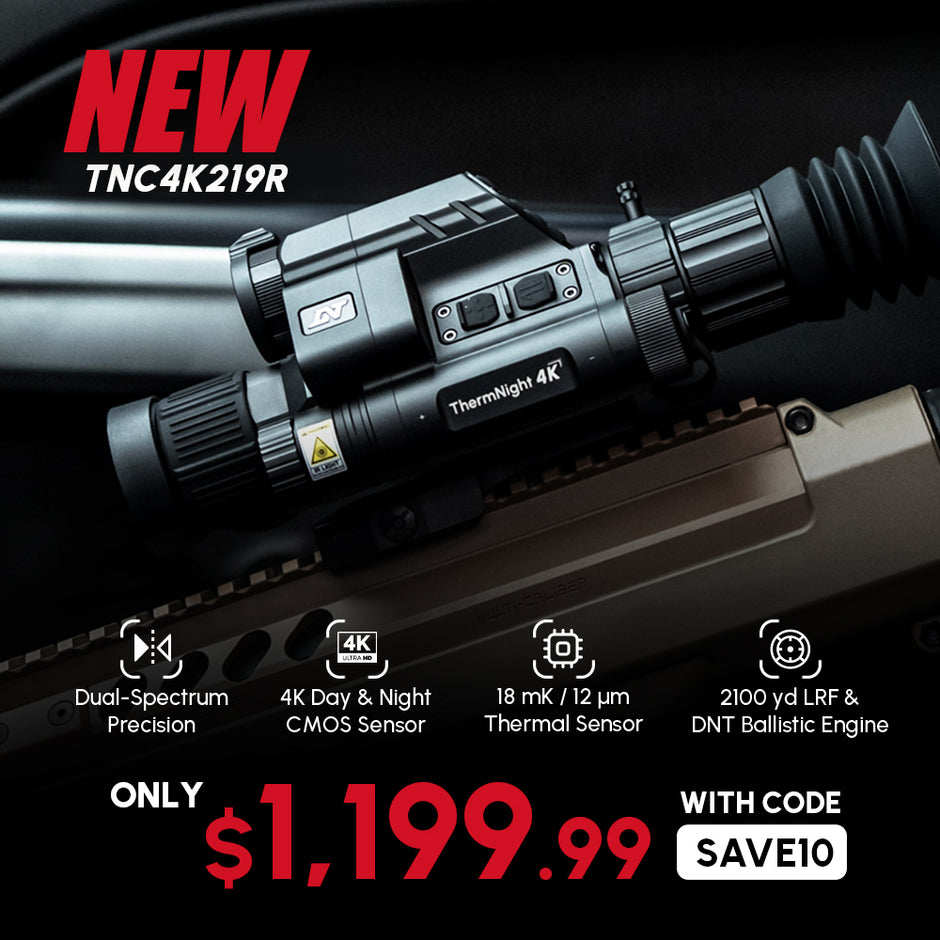
More detail, more flexibility, and a better viewing experience. The TNC4K219R combines a 3x base magnification and wider field of view for easier stalking and tracking, 3–6x lossless zoom for getting closer without sacrificing image quality, and up to 24x magnification for revealing more detail at longer distances.
2. "Which should I choose: TNC4K219R or TNC225R?"
Choose the TNC4K219R for sharper imaging, greater viewing comfort, and more advanced features. Choose the TNC225R for a lighter setup and greater thermal magnification flexibility.
Compared with the TNC225R, the TNC4K219R offers:
- Sharper display: 1920×1080 Micro-OLED vs. 1024×768
- Higher-resolution day/night imaging: 3840×2160 vs. 1920×1080
- More forgiving eye relief: 65 mm vs. 45 mm
- Longer battery life: Up to 5h 45m with a 21700 battery vs. 5h with an 18650 battery
- More onboard storage: 64 GB vs. 32 GB
- Longer-range LRF: up to 2,100 yd vs. 1100 yd
- Advanced software: One Tap Connect and Thermal Auto Zeroing
The TNC225R, meanwhile, is lighter at 22.8 oz and offers up to 12x thermal magnification, making it a strong choice for hunters who prioritize a lighter setup and greater thermal magnification flexibility.
3. "Why does the TNC4K219R use a 19 mm thermal lens?"
The 19 mm thermal lens is intentionally selected to optimize the TNC4K219R for multispectral detection and identification. Compared with the TNC225R, it provides over 30% wider thermal FOV, making it easier to scan a larger area and quickly detect heat signatures.
The 19 mm design also allows the thermal objective to be positioned above the Day/Night Objective, creating space for an upgraded 50 mm f/1.8 Day/Night Objective Lens. This delivers up to 40% higher detail resolution than the TNC225R's 52mm f/2.4 lens, strengthening the Day/Night channel's ability to identify targets and support precise aiming.
The result is a deliberate division of roles: thermal imaging provides a wider view for detection, while 4K day and night vision delivers the detail needed for identification and aiming.
4. "How does Thermal Auto Zeroing work?"
Thermal Auto Zeroing automatically adjusts the thermal reticle position based on your Day/Night zero.
Enter the correct zero distance, then zero the Day/Night channel first. The system will automatically calculate the corresponding thermal reticle position. You can then follow the on-screen instructions to fine-tune the thermal channel if needed.
- Always zero the Day/Night channel first. Thermal Auto Zeroing works in one direction and does not change previously saved Day/Night coordinates.
- For detailed step-by-step instructions, please refer to the user manual.
5. "What is the warranty for the TNC4K219R?"
The ThermNight TNC4K219R includes a standard 2-year warranty. Register your product after purchase to extend the warranty to 3 years.
6. "Why does the TNC4K219R come with two mounts?"
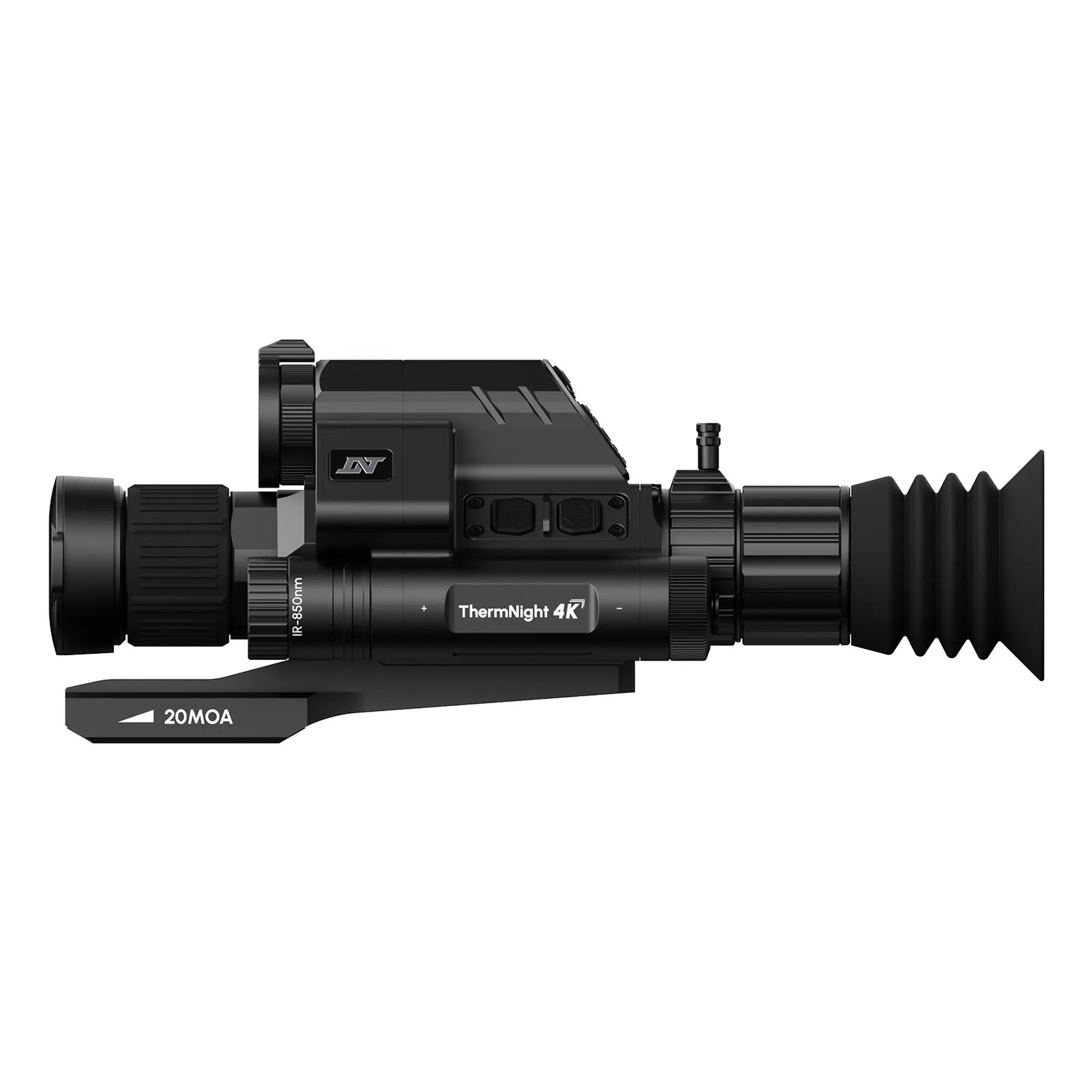
We include both a rearward-reaching 20 MOA cantilever mount (PM20L) and a standard quick-detach mount (QDS150) to support different firearm platforms and shooting applications.
PM20L 20 MOA Rearward Cantilever Mount
Designed for platforms that require additional elevation adjustment or extended eye relief. The built-in 20 MOA cant helps compensate for bullet drop at longer distances, making it suitable for platforms such as crossbows, .22 LR rifles, and long-range setups. The rearward cantilever design also positions the optic closer to the shooter’s eye on rifles with limited rail space.
QDS150 Standard Quick Detach Mount
Designed for modern sporting rifles and AR platforms with standard eye relief requirements. The quick-detach levers allow fast installation and removal while maintaining reliable return-to-zero performance.
By including both mounts, the TNC4K219R supports a wider range of setups without requiring an additional mount purchase.
7. "Why does the TNC4K219R have a different objective lens layout compared to other ThermNight models?"
The TNC4K219R places the day/night objective lens below the thermal lens. This layout provides enough space for a larger-aperture day/night lens while maintaining a compact design and a wider thermal field of view.
8. "What type of battery should I use?"
The TNC4K219R requires flat-top 21700 Li-ion batteries. For best performance and safety, use the two batteries included with the scope or purchase compatible batteries from DNT.
Important compatibility and safety notes:
- Fit constraints: Batteries with button tops or thick outer wraps will not fit inside the battery compartment.
- Safety warning: Do not use modified, re-wrapped, or unbranded batteries, as they may damage the scope or pose a safety risk.
9. "Why does the IR illuminator automatically dim or turn off?"
This is a built-in safety feature designed to prevent overheating and protect the scope.
When operating at Levels 4 and 5, the IR illuminator generates more heat. To protect the device, its brightness automatically reduces to Level 3 after 10 minutes of continuous use.
Regardless of the selected brightness level, the IR illuminator automatically turns off after 30 minutes of continuous operation.
10. "Will strong sunshine damage the thermal sensor?"
Yes. Direct exposure to strong sunlight or other intense heat sources can permanently damage the thermal sensor.
Avoid pointing the thermal lens directly at the sun. Keep the thermal lens cap closed when the scope is not in use to help protect the sensor.
11. "What should I do if the scope display turns red or blue?"
In most cases, this is caused by poor contact between the battery cap and the scope.
- Make sure the battery cap is fully tightened.
- Clean the battery cap threads and contact points to remove dirt or debris that may interfere with electrical contact.
12. "How do I measure the scope height of the TNC4K219R?"
Because the ThermNight series uses two objective lenses, measure the distance from the center of the lower day/night lens to the center of the barrel when entering the scope height into the onboard ballistic calculator.
13. "Why isn't One Tap Connect working?"
The most common reason is a connection timeout. To conserve battery power, the DNT app stops actively scanning for devices 2 minutes after launch.
If your scope is not detected within this time, tap the [Device] icon in the app to restart the scanning process.
Other possible causes include:
- Bluetooth permissions are not enabled on your mobile device.
- The DNT app is outdated. Version 1.4.6 or later is required.
- The pairing code displayed on the scope has not been confirmed.
For detailed connection instructions and troubleshooting, please refer to the user manual.
HYDRA-Mini HS210M
How much does the HS210M weigh?
At just 320 g (11.3 oz), the HS210M is lightweight and easy to carry across configurations.
How is the HYDRA-Mini different from the HYDRA Series?
The HYDRA-Mini builds on the proven 3-in-1 versatility of the HYDRA Series with an added helmet-mounted capability. It supports four configurations: standalone, handheld, helmet-mounted, and clip-on. At just 11.3 oz, the HYDRA-Mini HS210M is also more compact and lightweight than the HYDRA, making it easier to carry and deploy across different setups.
What do I need to mount the HYDRA-Mini to a helmet?
The HYDRA-Mini requires a compatible helmet setup with a shroud, helmet mount, and a dovetail binocular bridge in Wilcox or KVC/RQE format. The included QDF193 Dual Quick-Detach Flip-to-Side Mount features a Picatinny-to-Dovetail Dual Adapter that supports both formats, so no additional adapter is required.
After mounting, perform mechanical collimation first, then fine-tune the alignment using the HS210M’s onboard digital collimation.
What day optics work best with the HYDRA-Mini in clip-on mode?
The HYDRA-Mini is best paired with day optics with a 1–2x base magnification for an optimal viewing experience. This setup provides a wide field of view while allowing the day optic to provide additional magnification when needed.
Can I use my day optic’s reticle in clip-on mode?
Yes. In clip-on mode, the HYDRA-Mini provides a true 1x thermal view, allowing the day optic’s reticle to remain visible and usable for aiming. The day optic can also be magnified to zoom in on the thermal image while the HYDRA-Mini remains at true 1x.
Can I switch between different configurations without re-zeroing?
Yes. After zeroing or collimating each configuration for the first time, its settings are saved internally. When switching between configurations, simply select the corresponding mode or profile and rely on the QDF193’s exceptional return-to-zero reliability.
How does the HYDRA-Mini perform in complete darkness?
The HYDRA-Mini uses thermal imaging to detect heat signatures in complete darkness and challenging lighting conditions, providing reliable thermal visibility without relying on ambient light.
What battery does the HYDRA-Mini use?
The HYDRA-Mini uses flat-top 18650 batteries with dimensions of 65 mm × 18 mm. Some 18650 batteries may include a protection board, increasing their length to 68–69 mm. These longer batteries are not compatible with the HYDRA-Mini.
What is the warranty for HYDRA-Mini scopes?
The HS210M come with a 2-year warranty, extended to 3 years after product registration.
Does the HYDRA-Mini come with a mount?
Yes. The HYDRA-Mini comes with the QDF193 Dual Quick-Detach Flip-to-Side Mount, enabling quick switching between four configurations: standalone, handheld, helmet-mounted, and clip-on.
Does the HYDRA-Mini come with a laser rangefinder (LRF)?
No. The HYDRA-Mini does not include an onboard LRF. For integrated rangefinding capabilities, consider the HYDRA-LRF 3-in-1 Multi-Function Thermal Scope or the HOUND Ballistic Thermal Monocular.
Do I need to purchase a memory card for the HYDRA-Mini?
No. The HYDRA-Mini comes with 32 GB of built-in storage, so no additional memory card is required.
- Choosing a selection results in a full page refresh.